

Java 8 provides the following features:
- Lambda Expression
- Method Reference
- Default Methods
- Functional Interface
- Optional Class
- String Joiner
- Stream API
- Concurrency Enhancements
Lambda Expression:
A new feature in java 8 allowing us to treat actions as objects. It is a short block of code and it’s similar to methods, but they do not need a name and it can be implemented at the body of the method.
Implementation is not require to call (Anonymous call)
Example :
import java.util.ArrayList;

public class Main {
    public static void main(String[] args) {
        ArrayList<Integer> numbers = new ArrayList<Integer>();
        numbers.add(5);
        numbers.add(9);
        numbers.add(8);
        numbers.add(1);
        numbers.forEach( (n) -> { System.out.println(n); } );
    }
}
Method Reference:
It enable us to define the Lambda expressions by referring to methods directly using their names.
It is a shorthand notation of a lambda expression to call a method. For example: If your lambda expression is like this: str -> System. println(str) then you can replace it with a method reference like this::System.

Default Method:
It’s a method with an implementation which can be found in an interface.
Usually when we add a new abstract method to an interface, all implementing classes will break until they implement the new abstract method. In Java 8 this problem was solved by using default method.
@java.lang.FunctionalInterface
interface Processor {
    String process(String str);

    default void printing() {
        System.out.println("Interface printing");
    }

    static void print(String str){
        System.out.println("Static Printing "+str);
    }
}
Functional Interface:
An Interface that contains only one abstract method is known as functional interface. It can have any number of default and static methods. It can also declare methods of object class.
Functional interfaces are also known as Single Abstract Method Interfaces (SAM Interfaces).
Runnable interface is the best example of Functional Interface. It has only one abstract method run(), we can create a thread object using lambda expression.
//Normal thread creation
Thread thread = new Thread(new Runnable() {
    @Override
    public void run() {
        System.out.println("thread");
    }
});
We could simply do:
Thread thread1 = new Thread(() -> System.out.println("thread1")); //lambda expression
new Thread(PrintClass::doPrint).start(); //method reference
Optional Class :
New class implemented in java.util package in Java 8. The purpose of this class is to provide a type-level solution for representing an optional values instead of null references. (i.e we can avoid null pointer exception & null checks)

package java8;

import java.util.Optional;

public class OptionalEx {

    public static void main(String[] strs) {

        Optional<String> stringOptional = Optional.of("hey hi");
        System.out.println(stringOptional);

        String[] str = new String[10];
        Optional<String> nullCheck = Optional.ofNullable(str[0]);
        if(nullCheck.isPresent()) {
            //if we're not using Optional we can expect nullPointerException on str[0].toLowerCase()
            System.out.println(str[0].toLowerCase());
        } else {
            System.out.println("No value");
        }
    }
}

Output:
Optional.empty
Optional[hey hi]
No value
StringJoiner:
Java added a new final class StringJoiner in java.util package. It is used to construct a sequence of characters separated by a delimiter. We can create a string by passing delimiters like comma(,), colon(:) and square-brackets([]). We can easily pass the square brackets as prefix & suffix to the character sequence.
package java8;

import java.util.StringJoiner;
public class StringJoinerEx {
    public static void main(String[] args) {
        StringJoiner joinNames = new StringJoiner(",", "[", "]");   // passing comma(,) and square-brackets as delimiter

        // Adding values to StringJoiner
        joinNames.add("Iron Man");
        joinNames.add("Thor");
        joinNames.add("Hulk");
        joinNames.add("Black Widow");

        System.out.println(joinNames);
    }
}

Output:
[Iron Man,Thor,Hulk,Black Widow]
Streams :
- If we want to process a bulk objects of collection then we can go for java streams.
- It’s a special iterator class that allows to processing collection of objects in a functional manner.
Ex : Fetch all objects of collection of list which is greater than & equal to 22.
By Implementing without Streams :
List<Integer> list = new ArrayList<Integer>();
list.add(1);
list.add(11);
list.add(22);
list.add(33);
list.add(44);
list.add(55);
list.add(66);

//Normal way
List<Integer> newList = new ArrayList<Integer>();
for (Integer i : list) {
    if (i <= 22) {
        newList.add(i);
        System.out.println("Available elements : " + i);
    }
}
By using Streams:
//By using streams
List<Integer> newList = new ArrayList();
newList = list.stream().filter(x -> x<=22).collect(Collectors.toList());
By this way we can implement the streams, by using streams we can reduce the number on lines of code.
We can get stream object by:
- Stream s = collectionObj.stream();
- Once we get stream we can process object of stream.
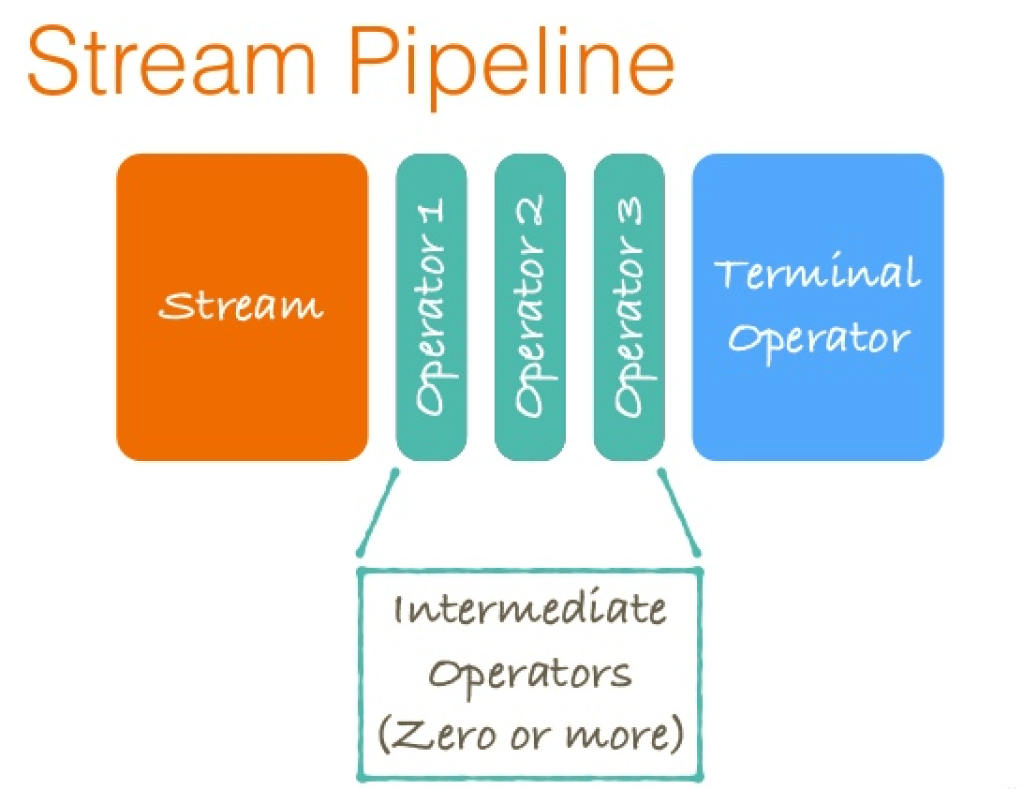
- Processing of stream consist of two stages:
- Intermediate operations
- Terminal operations
- Intermediate operations:
- map
- filter
- sorted
- Terminal operations:
- collect
- forEach
- reduce


 Strange Coder
Leave a comment